
SASSA Status Check: SRD R370 Status & Payment Dates
Published: Modified: Last verified: August 2026 Written by: Themba Matlou
To check your SASSA SRD R370 status, open the official portal at srd.sassa.gov.za and enter your 13-digit South African ID number and the cellphone number registered with SASSA. Your result shows as Approved, Pending, or Declined. Because SASSA approves the grant month by month, your payment date changes each month — check your status after the 20th to see your exact payday.
SASSA Payment Date Finder
Payment dates and amounts are based on publicly available SASSA information and may change.
Use this official SASSA portal to check your SRD application status and payment date.
Check Your SRD Status on Official WebsiteYour privacy is protected. We do not collect, store, or process your ID number or phone number. Clicking the button above opens the official SRD SASSA status portal directly - we simply guide you here.
Beneficiaries can check their SASSA SRD status online using their South African ID number and registered phone number. Your status will reflect as Approved, Pending, or Declined based on SASSA's monthly means test and eligibility verification against government databases including SARS, UIF, and NSFAS.
Personal Details must match exactly what is on your SASSA application. Using a different number will return no result, not because something is wrong, but because SASSA links your entire application to that specific number.
Need to check your payment release timelines?Jump to payment release timeframes by bank
When Does SASSA Pay SRD R370 Grant? Latest Payment Dates
SASSA pays the SRD R370 grant in batches during the last week typically from to of each month. The SRD has no single fixed payment date - your personal pay date is assigned once your monthly eligibility check clears, and it appears on your status page at srd.sassa.gov.za/sc19/status. If a pay date falls on a weekend, payment moves to the next business day.
COVID-19 SRD Payment Dates August 2026
COVID-19 SRD payment dates for August 2026 are scheduled for: , , and .
SRD Payment Dates for July 2026: 23–24 July
SASSA is paying the R370 SRD grant for July 2026 on and .
Paid to Bank account, SASSA-linked account, or retail collection point.
SASSA SRD Payment Dates for June 2026: 24–25 June
- Payment window: 24–25 June 2026
- Grant amount: R370 per month
- Find your exact date: check your status at srd.sassa.gov.za using your ID and registered cellphone number
- If your money is late: allow 2–3 business days after your pay date, then call SASSA on 0800 60 10 11
Note: To view your exact payment date, you must check your SASSA SRD status online. Click on button given below:
Why is my SRD approved but no payday showing?
If your SASSA SRD status shows "Approved" but no payday (blank, or it says "null"), it usually means you qualify for that month but SASSA has not assigned your payment date yet. This is normal. SRD pay dates are assigned in the last week of the month (around the 24th–30th). Check before then and the date often won't show.
Why SASSA not Assign you a Payment Date?
- Identity / biometric check is pending. If SASSA sent you an SMS link for a selfie or verification, your payment stays on hold - even while the status says "Approved" - until you complete it.
- Bank verification is still running. If you recently added or changed your bank details, SASSA verifies the account before assigning a date.
When to contact SASSA?
If the payment window for the month has ended and you still have no payday, call 0800 60 10 11 (Mon–Fri, 8am–4pm) with your ID number ready, and ask specifically why no payday has been assigned. You can also message "Status" on WhatsApp to 082 046 8553, or visit your nearest SASSA office with your ID.
Payment date tables for upcoming months are added here as SASSA confirms them. Previous months are removed once payments have been processed.
Why Is My SRD Approved but Payment Missing?
The SRD is assessed independently every month, so being approved does not always mean payment is released. A month can show Approved but go unpaid if a banking-detail error, a means-test flag, or a verification block applied that cycle. Approval confirms you qualify; payment only follows once your account passes verification and your batch is processed for that specific month.
- Check each month separately — confirm it shows a pay date, not just "Approved".
- Verify your bank details are correct and active for every cycle.
- For a past month that was approved but never paid, call 0800 60 10 11 and ask whether a back-payment applies.
What Does My SASSA SRD Status Mean?
Your SASSA SRD status shows where your application stands for that month. Approved means you qualify, Pending means SASSA is still verifying, and Declined means you did not meet a rule for that month. Other results — Referred, Bank Details Pending, Cancelled, Suspended and Failed — each have a specific meaning and next step, explained below.
| Status | What it means | What to do |
|---|---|---|
| Approved | You qualify for this month | Wait for your pay date to appear on your status |
| Pending | Verification still in progress | Check again after a few days: what pending means |
| Declined | Not approved — a reason is shown | Read the reason; appeal within 90 days if wrong |
| Referred | Sent for extra identity/fraud verification | Complete your eKYC; not a decline |
| Bank Details Pending | Your bank account is not yet verified | Confirm your account is active and in your name |
| Reapplication Required | Your application has lapsed | Submit a fresh application for the new cycle |
| Cancelled | The grant was closed by you or SASSA | Reapply or contact SASSA to reinstate |
| Suspended | Payments paused, usually after a failed ID check | Complete eKYC or visit a SASSA office |
| Failed | Usually a technical or data problem | Recheck your details; try WhatsApp or USSD |
| No Record Found | Your ID/phone doesn't match an application | Use the exact number you applied with |
What Does "Referred" Mean on My SASSA SRD Status?
A "Referred" status means SASSA has flagged your application for extra identity or fraud verification before your payment can continue — it has been sent to another department to confirm your details. Referred is not a decline. Most referred applications are approved once verification clears. The usual fix is to complete your eKYC (facial) verification on the official portal. Processing can take a few weeks.
What to do if your status says Referred:
- Complete your eKYC biometric verification at srd.sassa.gov.za if you have not already.
- Make sure your ID details and cellphone number on the application are correct.
- Do not reapply — a referred application is still active and being reviewed.
- Check your status again after a few days. If it later changes to Declined, read the reason and appeal.
- If it stays referred for several weeks, call SASSA on 0800 60 10 11.
What Does "Bank Details Pending" Mean on SASSA SRD?
"Bank Details Pending" means SASSA either has no banking details for you yet, or is still verifying the account you submitted. SASSA checks that the account is active, valid, and in your own name before releasing payment. A dormant or closed account, or a name that does not match your ID, will keep this status stuck. It must clear before any approved payment can be made.
How to fix Bank Details Pending:
- Confirm your bank account is active and in your own name — SASSA will not pay a third-party account.
- If the account is dormant, make a small deposit or withdrawal to reactivate it.
- Check the account number and that your name matches your ID exactly.
- Do not resubmit your details repeatedly — this slows verification. Allow a few days to a week.
- Update banking details only if something is wrong, at srd.sassa.gov.za/sc19/banking-details-update.
What Does "Cancelled" or "Suspended" Mean on SASSA SRD?
Cancelled means your grant was closed — either you requested it, you did not complete a required step, or your circumstances changed. Suspended means your payments are temporarily paused, usually after a failed identity or biometric check. A suspended grant can be reactivated by completing your eKYC verification or visiting a SASSA office; a cancelled grant usually means you must reapply for the current cycle.
- Suspended: complete eKYC at srd.sassa.gov.za or visit a SASSA office with your ID.
- Cancelled: if you did not cancel it yourself, call 0800 60 10 11 immediately — it may be fraud.
- To restart a cancelled grant, submit a fresh application for the current period.
What Does "Failed" Mean on My SASSA SRD Status Check?
A "Failed" status usually points to a data or system problem, not a final decision. It often means your details could not be matched, or the portal had a temporary glitch. If a specific reason is shown (such as UIF Registered or an income flag), that is actually a decline — read the reason and appeal. If no reason is shown, recheck your details and try again.
- Confirm all 13 digits of your ID and that you used your registered cellphone number.
- If the site is slow or down, check by WhatsApp on 082 046 8553 or USSD on *134*7737#.
- Do not reapply just because a check failed — only reapply if your status says "Reapplication Required".
- If it failed with a decline reason, lodge a reconsideration within 90 days.
My SASSA Status Says "No Record Found" - Why?
"No Record Found" means the ID number and cellphone number you entered do not match any SRD application on SASSA's system. The most common cause is a phone-number mismatch — your entire application is linked to the number you applied with. It can also mean a typo in your ID, or that you have not applied yet. It does not mean your grant was rejected.
- Re-enter your 13-digit ID carefully and use the exact number you applied with.
- If you changed your number since applying, update it on srd.sassa.gov.za first.
- If you have never applied, start a new application on the official portal.
Why Does My SASSA Status Say "Reapplication Required" or "Application Already Active"?
"Reapplication Required" means your application has lapsed and you must submit a fresh declaration for the new cycle. "Application Already Active" means the opposite — you tried to apply again but you already have a live application, so you do not need to reapply, just check your status. In 2026, most approved beneficiaries are reassessed automatically and never need to reapply.
- Reapplication Required: log in to srd.sassa.gov.za/sc19/reinstate, complete the reapplication, then re-check after a few days.
- Already Active: do not submit again - duplicate applications can trigger a fraud flag. Just check your monthly status.
- You only need to reapply if your grant was cancelled, lapsed, or your details changed.
SRD R370 — Complete Resource Hub
Everything an SRD applicant may need in one place. Select what applies to your situation.
How to Apply? First time applying or need to reapply for the current periodHow to Appeal Appealing a declined month, what to include, and deadlines.Identity VerificationComplete or redo your eKYC biometric verification.Change Phone NumberUpdate the mobile number linked to your SRD application.Change Banking DetailsUpdate your payment method or bank account.SASSA Payment DatesSASSA social grant payment schedule for 2026–2027.Latest SASSA NewsRecent SRD updates, policy changes, and announcements.Expected Timeline to Receive Payment via Different Banks
| Payment Method | When You Can Receive Your Money |
|---|---|
| Timeline for Bank Accounts | Typically 2 to 3 business days after the Pay Date. Your bank needs this time to process and clear the deposit. |
| Timeline for Cash Send Payments | Often on the SAME DAY as the Allowance Date or the very next business day. You'll get an SMS with a reference number to collect. |
| SASSA Black Card Timeline | Usually on the fund release date itself. You can swipe or withdraw at an ATM once the payment reflects. |
Looking for payment dates for other SASSA grants? Old Age Pension, Disability Grant, and Child Support Grant payments follow a fixed monthly schedule. View the full SASSA 2026 2027 Payment Dates schedule
Why Is the SASSA SRD Status Check Not Working Today?
The SRD portal is usually down for one of two reasons: a temporary server overload (common in the last week of the month when millions check at once) or a browser/cache issue. Your application is not affected. Wait a couple of hours and try again, or use an alternative method WhatsApp, USSD, or SMS to check your status while the site is busy.
- Wait 2–4 hours and retry, especially at month-end.
- Clear your cache, or try a different browser, device, or network (Wi-Fi vs data).
- Check another way: WhatsApp 082 046 8553, USSD *134*7737#, or SMS STATUS + ID number to 32555.
- Make sure you are on the official srd.sassa.gov.za - fake look-alike sites are common.
SRD Appeal Status Check
If you have already submitted an appeal for a declined month, check your appeal outcome below. This is a separate check from your monthly grant status above.
Your privacy is protected. We do not collect, store, or process your ID number or phone number. The button above opens the official SASSA Appeals Portal directly.
You will need your 13-digit South African ID number and the mobile number linked to your SRD application to receive your OTP and access your appeal result.
How to change your SRD phone number →No longer have access to that number?You cannot access the appeals portal until you update it first.What your appeal result means:
| Appeal Result | What It Means | Next Step |
|---|---|---|
| Appeal Pending | Your appeal is still being reviewed by ITSAA | Check back in a few days, reviews take 60 to 90 days |
| Appeal Approved | ITSAA approved your appeal | SASSA will back-pay that month, check your grant status for payment date |
| Appeal Declined | ITSAA upheld the original decline | The decision is final for that month, See appeal status FAQs below |
ITSAA, the Independent Tribunal for Social Assistance Appeals, reviews all SRD appeals independently from SASSA.

Not yet appealed and want to? The appeal process is separate from this status check. Read our step-by-step SRD appeal guide → before submitting, there is a 90-day deadline from the date of decline.
Appeal Status FAQs
Can I appeal again if my appeal was declined?
No. Once ITSAA declines an appeal for a specific month, that decision is final for that month within the SASSA system. You cannot submit a second appeal for the same month.
Does a declined appeal affect my next month's SRD application?
No. Each month is assessed independently. A declined appeal for one month has no effect on your eligibility or result in any future month.
Can I take the matter further if my appeal is declined?
Yes, but it is outside the SASSA system entirely. If you believe ITSAA made a procedural error or acted unfairly, your remaining option is a judicial review through the courts. This is a formal legal process and requires the assistance of a qualified attorney or legal aid. You can contact the Legal Aid South Africa helpline on 0800 110 110 for free legal advice if you cannot afford a private attorney.
Available Methods to Check Your SRD Status
The official SASSA SRD portal is the most reliable method and shows your full month-by-month history. If you cannot access it, use any of the alternatives below.
Method 1 — Official SASSA SRD Portal (Recommended)
The primary and most detailed method. Shows your full status history across all months, your payment date if approved, and your decline reason if applicable.
- Go to srd.sassa.gov.za/sc19/status ↗
- Enter your 13-digit South African ID number
- Enter the mobile number you used when you applied
- Click Submit, your SRD status for each month will be displayed
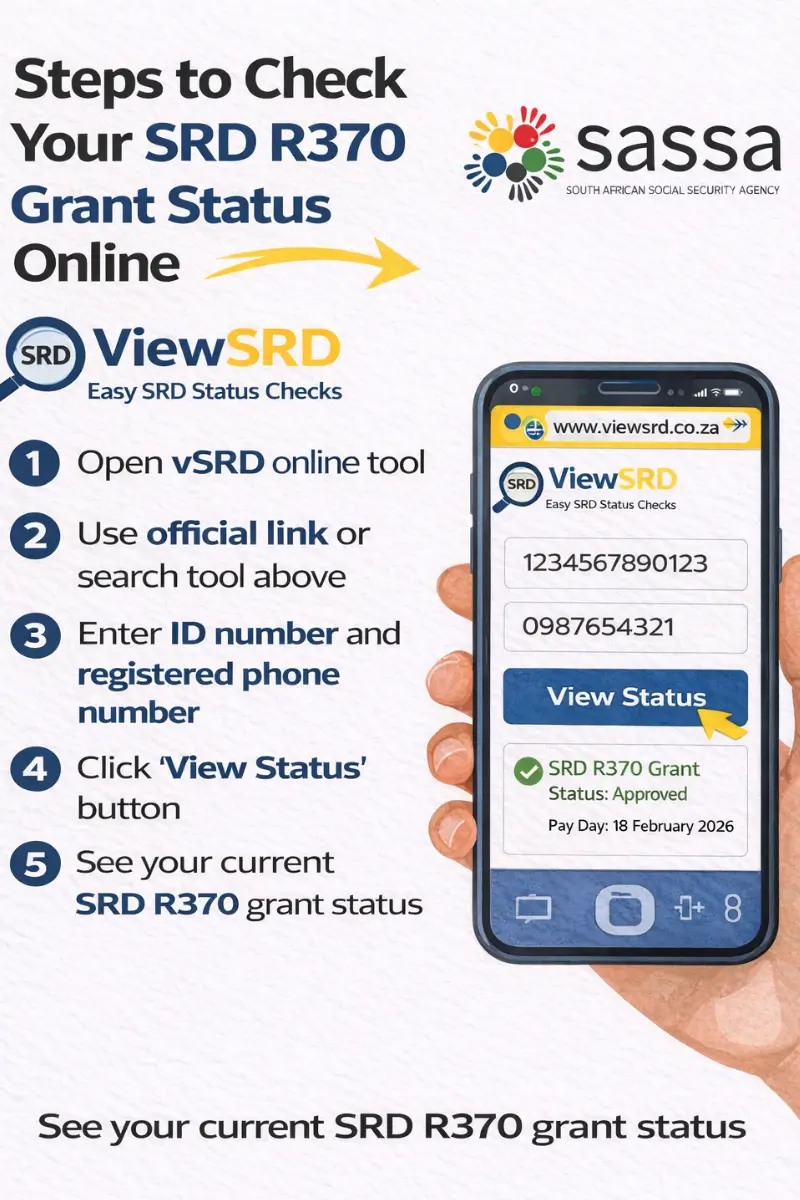
Method 2 — ViewSRD Tool (This Site)
Use the tool at the top of this page. It opens the official SASSA portal directly in a secure window, no data is collected on our end. Your full month history is visible, not just the current month.
Bookmark vsrd.co.za directly. Avoid searching for sassa status checks on social media and browsers, fake links are widespread.
Method 3 — WhatsApp
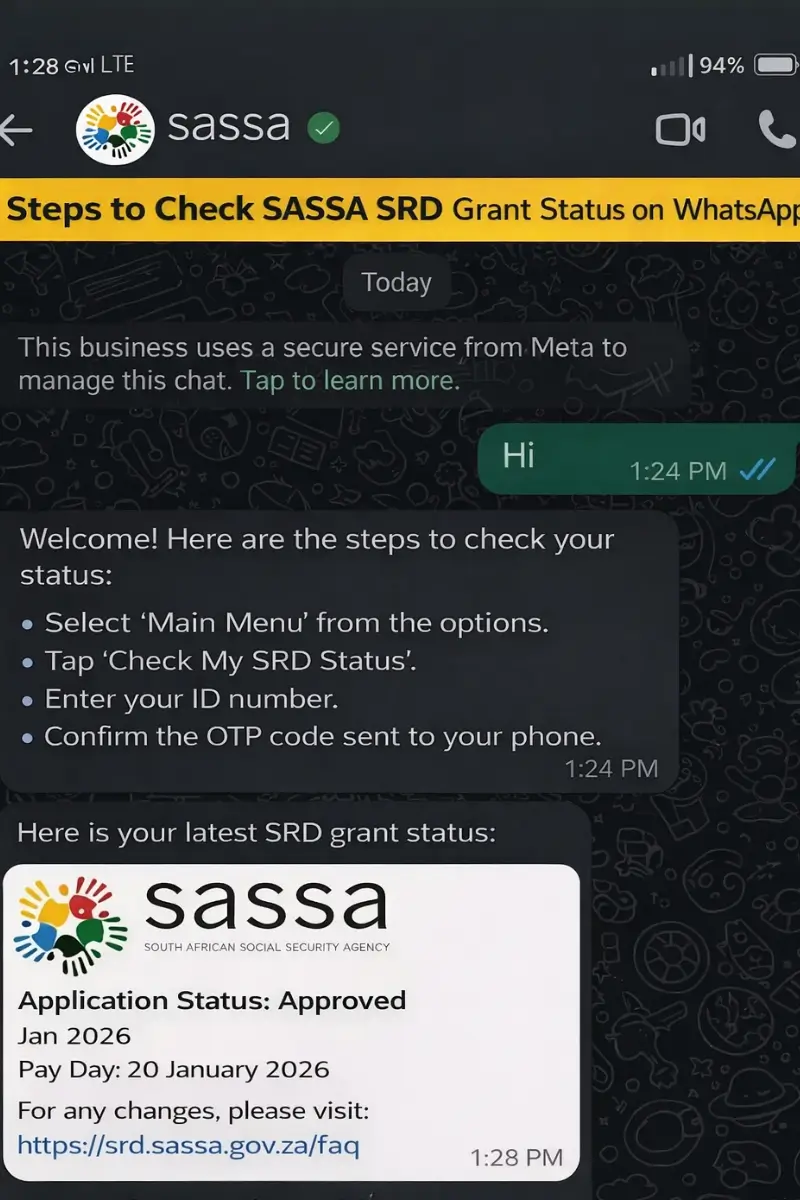
A convenient option for a quick status result without needing a browser.
- Save 082 046 8553 in your contacts as "SASSA Official"
- Open WhatsApp and send the word "Status" to start the chat
- The SASSA chatbot will ask for your ID and registered phone number
- Your current status will be returned in the chat
Available 24/7. Only use this number (082 046 8553) do not use any other WhatsApp number claiming to be SASSA
Method 4 — USSD Code (No Internet Required)
Works on any South African cell phone without data or a smartphone.
- Dial *134*7737# from your registered SIM card
- Select the SRD status option from the menu
- Enter your ID number when prompted
- Your status will display on screen
Standard network rates may apply. If the session times out, try again or use the portal.
Method 5 — SMS
A basic option if you have no internet or WhatsApp access.
- Open SMS on your phone
- Type: STATUS followed by your 13-digit ID number (e.g. STATUS 1234567890123)
- Send to 32555 from the mobile number registered on your SASSA application
- You will receive a reply with your current status
Method 6 - SASSA Call Centre
Call 0800 60 10 11 (toll-free, Monday to Friday 08:00–16:00) and follow the voice prompts for SRD status. Have your ID number and registered phone number ready. Useful if all digital methods are unavailable or if you need to speak to an agent about a specific issue.
Method 7 — Visit a SASSA Office
If you are unable to resolve your status online or by phone, visit your nearest SASSA office in person. Bring your South African ID document and the mobile number linked to your application. Staff can check your profile and advise on next steps
Find your nearest office: Click Here
SRD Status FAQ’s
What do I need to check my SRD status?
Your 13-digit South African ID number and the 10-digit mobile number you used when you applied. Both must match your SASSA application exactly. Using a different number will return no result.
How often does SRD status update?
SASSA processes applications in monthly batches, results do not update in real time. Check every few days rather than multiple times a day. If your status has not changed after two weeks, there may be a specific reason holding your result.
Why is my status different for different months?
The SRD grant is assessed month by month, each month is a separate verification. Being approved in one month does not carry over to the next. Always check the specific month shown next to your result on the portal.
My details are correct but no status is showing — why?
The most common cause is a phone number mismatch. Your entire SASSA profile is linked to the number you registered with. If you have changed your number since applying, you need to update it on the SRD portal before your status will display.
How much is the SRD grant in 2026 and is it ending?
The grant remains at R370 per month. The SRD grant has been allocated an additional R36.4 billion to extend payments until 31 March 2027 at the current R370 per month. No increase was announced in the 25 February 2026 Budget Speech. Any social media post claiming the grant is ending or increasing to R400, R700, or any other amount is false.
When will I receive my payment after being approved?
SRD payments are released in the last week of the month. Your exact payment date is assigned individually and will appear on your status once processed, there is no single fixed date for all applicants.
Protect Yourself — SRD Scams to Watch Out For
SASSA has issued official fraud alerts warning SRD applicants about scams specifically targeting grant beneficiaries. Fraudsters know when payments are due and when applicants are anxious about a pending or declined status and they use that vulnerability deliberately.
SASSA will never:
| SASSA Never Ask For |
|---|
| Send you a WhatsApp message asking for your OTP, ID number, or banking details |
| Ask you to pay any fee to approve, speed up, or fix your application |
| Ask for your bank PIN, password, or card number under any circumstances |
| Contact you via personal social media accounts or unofficial WhatsApp groups |
If you suspect fraud or have been targeted:
Report it immediately to SASSA's fraud hotline: 0800 60 10 11 Email: GrantsEnquiries@sassa.gov.za Or report to your nearest SASSA office or local police station.
Official Reference Links
Use only these official channels for SRD status checks, appeals, and fraud reporting.
| Service | Official Link / Contact |
|---|---|
| SRD Status Portal | SASSA Status Check for SRD (Official Portal) |
| SRD Appeals Portal | https://srd.sassa.gov.za/appeals/appeal ↗ |
| SASSA Official Website | https://www.sassa.gov.za |
| SASSA Call Centre | 0800 60 10 11 Free call · |
| SAFPS (Fraud Listing) | https://www.safps.org.za ↗ 0860 101 248 |
| SASSA Fraud Email | GrantsEnquiries@sassa.gov.za |
- - Added Covid-19 SRD payment dates for August 2026
- - Added SRD payment dates for July 2026
- - Added SRD payment dates section. - Added reasons for “Status Approved but No Pay Date”. - Why is your grant payment missing? - Added all SRD status meanings and solutions
- Added simple steps to "Check SASSA SRD Status for Payment Date 2026"
- Initial homepage publication. Launched SRD information structure including status guidance, payment insights, and official navigation framework.
Contact Us with Queries
Having Issues? If you encounter a technical problem or error message while checking your SASSA or SRD status. Please contact us to report the issue so we can investigate and improve your experience. While we strive to make these guides as comprehensive as possible, you may have specific situations or need clarification. We value your input and questions, as they help us improve this resource for everyone. For all official applications, status checks, and appeals, you must use the official SASSA channels linked throughout our guides.
The best way to contact us is via (help.viewsrd@gmail.com)
Thank you for letting ViewSRD be part of your journey.