
Update Or Change SASSA Phone Number
Published: Modified: . Last verified: June Written by: Themba Matlou
To change your SASSA SRD R370 phone number, go to the official portal at srd.sassa.gov.za/sc19/mobile-number-update, click "SA ID number", and enter your 13-digit South African ID. Select a reason for the change (lost phone, third-party phone, new phone, or wrong number captured), choose your payment option, then verify your identity using the last 4 digits of your bank account or a facial scan. Finally, enter your new cellphone number and confirm with the OTP sent by SMS to that new number.
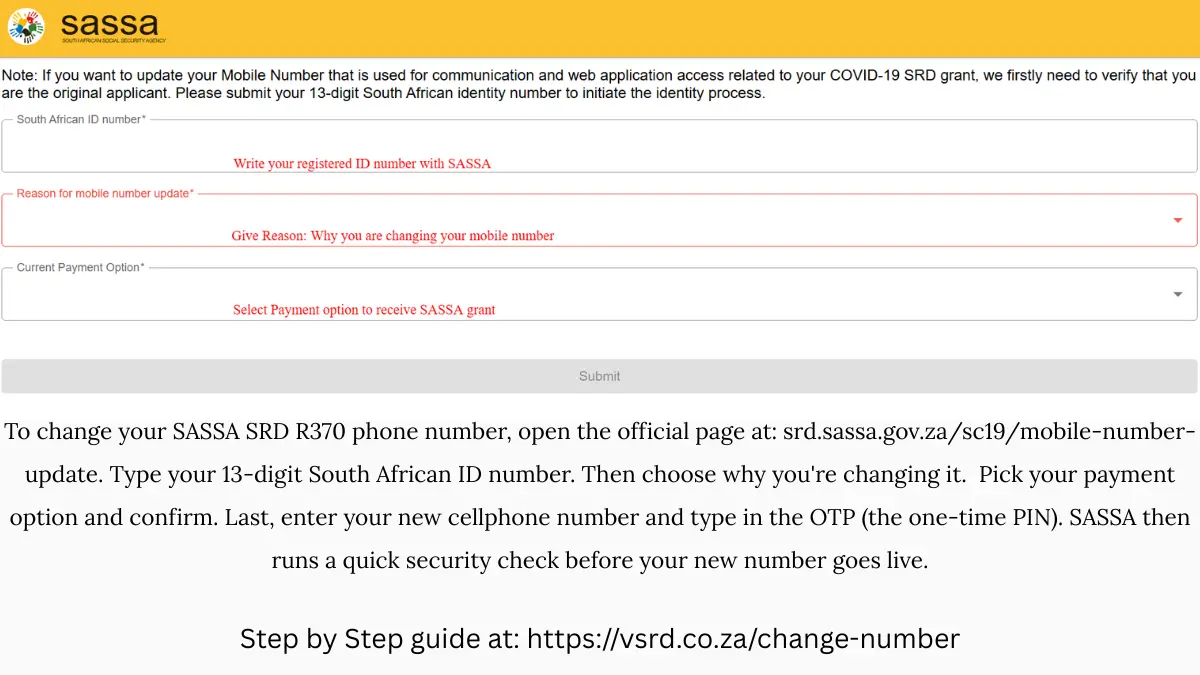
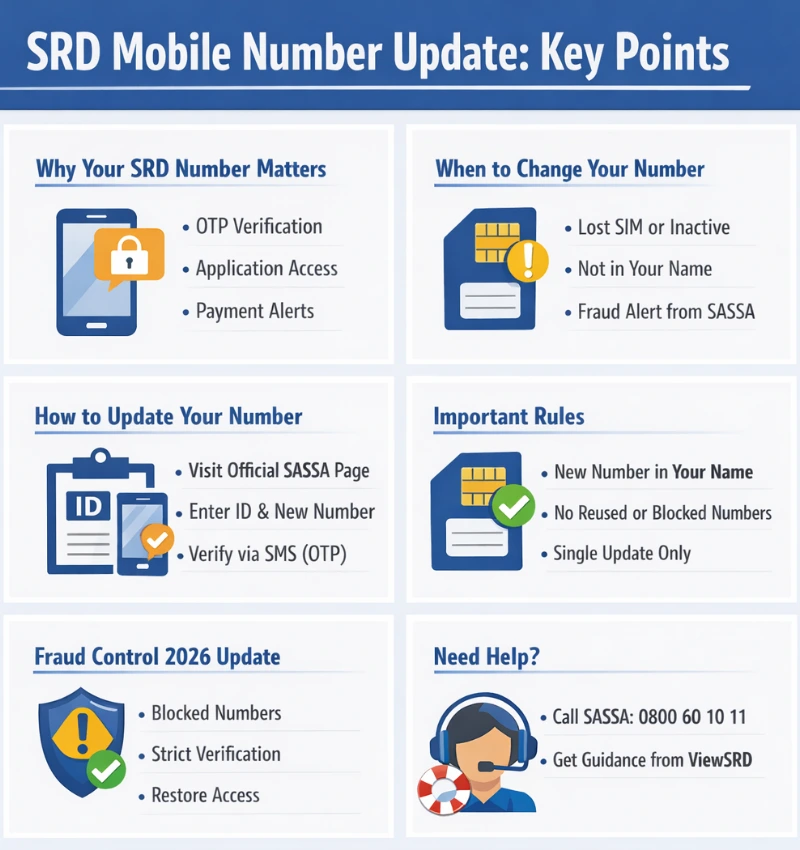
A number change may be required if the SIM is lost, inactive, not registered in your name, or flagged due to fraud risk. In all cases, the update process verifies your identity first and then replaces the old number on your SRD application record. Once updated successfully, the new number becomes the only valid contact number for SRD-related communication.
Official Procedure to Change SASSA Phone Number Online
Follow these steps to update your SRD mobile number using the official SASSA system.
Step 1: Use the Official SASSA SRD Website
Start on the official SRD website managed by SASSA. From there, select the option to change or update your mobile details. Always avoid third-party links or social media pages.
Securely Change Phone Number Link: https://srd.sassa.gov.za/said
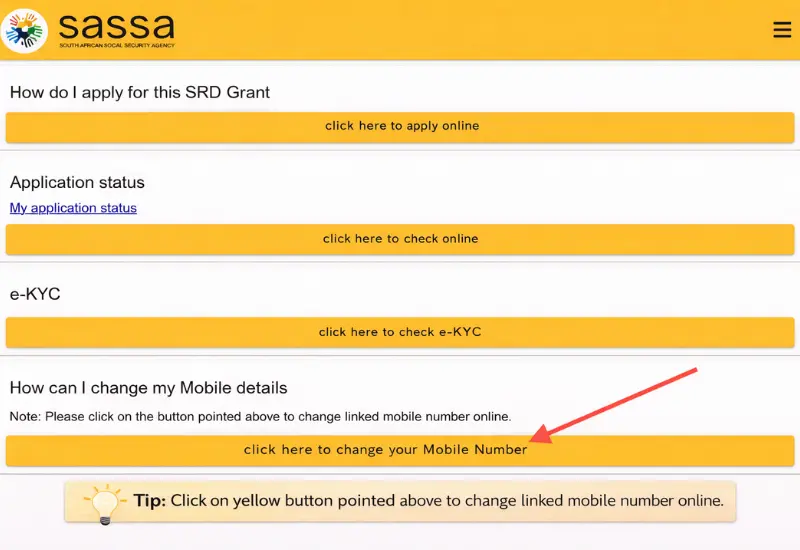
On SRD official page click on the button to change your mobile number in the Mobile details section. See in the image:
Step 2: Verify Your Identity
You will be redirected to: official SASSA change phone number page
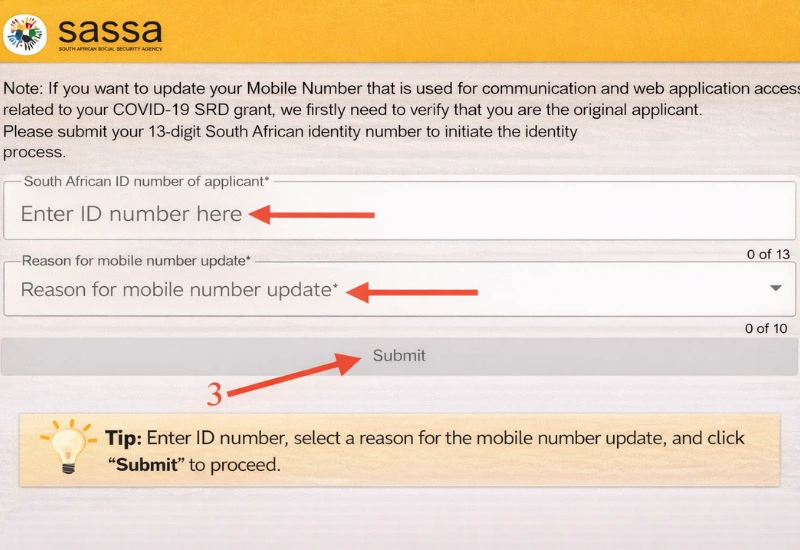
Here you will be required to confirm 13-digit South African ID number and reason to update/change phone number.
- Your 13-digit South African ID number
- Select the reason for the update from the dropdown.
Important: To prevent fraud in 2026, SASSA made it a mandatory step for applicants to verify their identity using facial recognition when changing a mobile phone number. This means you have to submit a selfie to confirm that you are the rightful SRD applicant. A new mobile number will only be updated after identity verification.
Step 3: Enter the New Mobile Number
Provide the new mobile number you want to use. The number must:
- Be active
- Be registered in your own name
- Not be the same number previously flagged or blocked (where applicable)
Step 4: Complete SMS (OTP) Verification
An SMS with a one-time PIN (OTP) is sent to the new number. Enter the OTP to confirm ownership and proceed.
Step 5: Submit the Update Request
After verification:
- Submit the request
- Wait for on-screen confirmation that the update was received
Only one successful submission is required. You do not need to repeat the process on multiple pages.
Step 6: Allow Time for the Update to Reflect
Once submitted:
- The new number replaces the old one in the SRD system
- Communication and access will use the updated number going forward
If the update is successful, no further action is required unless SASSA requests additional verification.
Official SASSA Pages Used for Phone Number
SASSA provides more than one official online page to update the mobile phone number linked to an SRD application. These pages were introduced at different times and are used in different situations, but they all update the same SRD application record in SASSA’s system.
The difference between the pages is how your identity is verified, not whether the number change is valid. Applicants only need to complete one successful update on the page that matches their situation.
When SASSA Requests a Phone Number Change Due to Fraud Risk
This scenario applies when SASSA has identified a fraud risk linked to the mobile number currently registered on the SRD application.
In these cases:
- The applicant is instructed to change their mobile number
- The old number cannot be reused
- A new number must be provided and verified by SMS (OTP)
Fraud Risk link: https://srd.sassa.gov.za/sc19/update
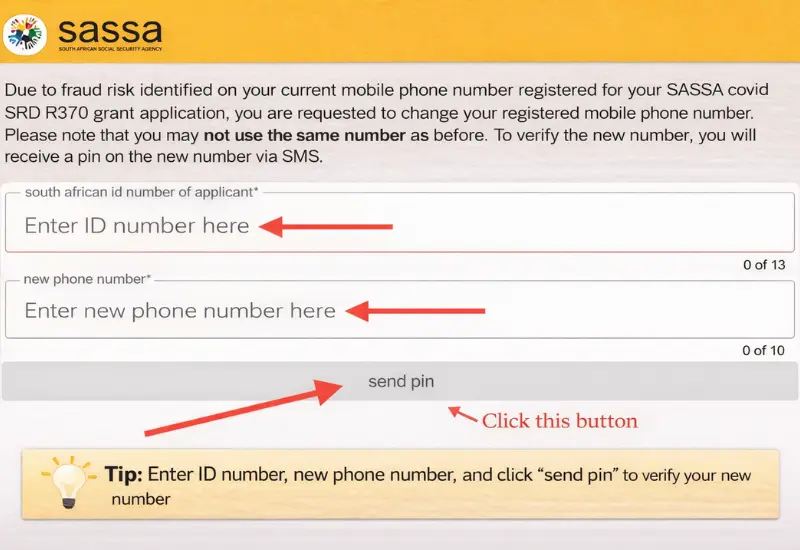
This page is typically used when:
- A phone number was shared or reused across multiple applications
- A number was linked to suspicious or unauthorised activity
- New fraud controls (notably in 2026) flagged the number, even if the applicant was not intentionally involved
Once the new number is verified, it replaces the old number in the SRD system and can restore access to application communication and payday updates.
When You Voluntarily Update Your SRD Mobile Number
This option is used when the applicant chooses to change their phone number, without a fraud notice from SASSA.
Common reasons include:
- The SIM card was lost or damaged
- The number is no longer active
- The number belongs to someone else
- The applicant wants to correct an incorrect or outdated number
To changing phone number process is given below:
- The applicant submits their South African ID number
- A reason for the mobile number update is selected or provided
- SASSA verifies the applicant’s identity before allowing the change
- Current change number link: srd.sassa.gov.za/sc19/mobile-number-update
This method is suitable for standard updates and is accessed directly from the SRD website’s help or contact options.
When the Application ID (AppID) Is Required
Some applicants are required to verify their identity using an Application ID (AppID) in addition to their ID number.
This usually applies when:
- The applicant still has the 6-digit AppID issued during application or reapplication
- Additional verification is required before contact details can be changed
- Both mobile number and email address may need updating
Link where Application ID Required: srd.sassa.gov.za/sc19/contact
Important points:
- The AppID acts as an extra security layer
- Only one contact update request can be submitted within a 24-hour period
If the AppID is available, this page can be used successfully to update the mobile number without needing to use the other options.
What Happens After Submitting a Mobile Number Update
After you submit a request to change your SRD mobile number, the update is processed within SASSA’s SRD system. Your identity verification is checked first, and once confirmed, the new number replaces the old one on your SRD application record.
At this stage:
- You do not need to visit a SASSA office
- You do not need to submit documents
- You should not submit the same request multiple times
All future SRD communication, including OTPs and status notifications, will be sent to the new mobile number once the update is applied.
How Long a Phone Number Update Takes to Reflect
In most cases, a mobile number update reflects within a short period after successful submission. However, the exact timing can vary depending on verification checks.
Important points to note:
- Updates may not reflect immediately on the status page
- System checks and fraud controls can cause short delays
- Only one update request is allowed within a 24-hour period on some pages
If your number does not reflect immediately, it does not mean the update failed. Allow sufficient time before attempting any further action.
What to Do If the SRD Phone Number Update Does Not Work
If you experience issues while updating your mobile number, consider the following checks:
- Ensure the new SIM card is registered in your name
- Confirm the ID number entered is correct
- Make sure the OTP SMS is received and entered correctly
- Do not reuse a number that was previously flagged or blocked
If the update still does not go through:
- Try using an alternative official SASSA update page that matches your situation
- Avoid submitting repeated requests within a short period
- Contact the SASSA call centre for assistance if required
Using unofficial websites or agents can result in further delays or risks.
Can Changing Your Phone Number Affect SRD Payments?
Changing your mobile number does not negatively affect your SRD eligibility. However, it can temporarily affect access and communication if not completed correctly.
Key points:
- Payments are linked to your SRD application record, not the phone number itself
- An incorrect or blocked number can prevent OTP verification and payment notifications
- Updating to a valid number registered in your name helps restore normal processing
If your payments were declined due to a phone number issue, successfully updating the number allows SASSA to reassess your application in future payment cycles.
Common Reasons SRD Applicants Need to Change Their Phone Number
There are several legitimate reasons why an SRD applicant may need to update the mobile number linked to their application. The SRD system relies heavily on the phone number for verification and communication, so any issue with the number can affect access and payments.
Common reasons include:
- The SIM card was lost, damaged, or blocked
- The mobile number is no longer active
- The number belongs to another person (family member, friend, or agent)
- The number was entered incorrectly during application
- The applicant no longer has access to the phone used originally
- SASSA requires an update due to security or verification checks
In all these cases, updating the mobile number ensures that the applicant can continue to receive SRD-related messages and complete required verifications.
Fraud-Related Phone Number Restrictions (2026 Update)
In 2026, SASSA strengthened fraud detection controls across the SRD system. As part of this process, certain mobile numbers may be flagged or restricted if they are linked to suspicious activity.
This can happen when:
- A phone number is used on multiple SRD applications
- A number is associated with known fraud patterns
- A SIM card is not properly registered or verified
- The number was used by third parties without the applicant’s knowledge
When a number is flagged:
- SRD payments may be declined or paused
- OTP verification may fail
- The applicant may be instructed to change their mobile number
Even if the applicant is otherwise eligible, payments may not resume until a new, valid mobile number is successfully updated in the system.
Important Rule: The New Mobile Number Must Be Registered in the Applicant’s Name
When changing an SRD mobile number, the new number must be:
- Registered in the applicant’s own name
- Active and able to receive SMS messages
- Not previously used or blocked for SRD purposes
Using a number registered to another person can lead to:
- Verification failures
- Payment delays
- Future fraud flags on the application
To avoid problems, applicants should obtain a SIM card registered in their name and use that number consistently for all SRD-related communication. This helps ensure smoother verification, uninterrupted access, and reduced risk of future payment issues.
Official SRD Reference Links
Use only these official channels for SASSA appeals, change number, and fraud reporting.
| Service | Official Link / Contact |
|---|---|
| SRD Appeals Portal | SASSA Portal for SRD Appeal |
| SASSA Call Centre | 0800 60 10 11 Free call · |
| SAFPS (Fraud Listing) | https://www.safps.org.za ↗ 0860 101 248 |
- Added easy steps to change SASSA phone number with Official link
- Updated Change number reasons section, added official reference links.
- Initial publication of "Update Or Change Mobile Number Linked with SRD"