
SASSA SRD Biometric Identity Verification
Published: Modified: · 5 min read · Written by: Themba Matlou
SASSA SRD identity verification - also called biometric, facial, or eKYC verification - is a security check that confirms you are the rightful owner of your SRD R370 grant before SASSA will release or continue your payments. You complete it on your own phone, with no documents or office visit needed: you open a one-time SMS link from SASSA and take a live selfie, which is matched against your official records to unlock your grant. It's triggered when your SRD status shows "Identity Verification Required" or "Referred," when you change your registered phone number or banking details, or — since 1 September 2025 — as a mandatory step for all new and reapproved applications. Until it's completed your payments stay on hold, so finishing facial verification correctly is what gets your money moving again.
How to Complete Your SRD Identity Verification?
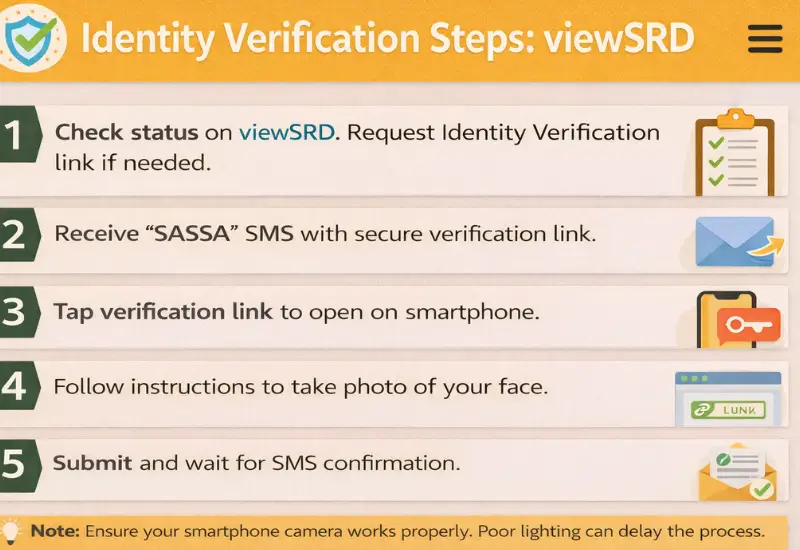
The SRD personal information procedure is completed electronically through the official SRD system. When verification is required, beneficiaries are guided through a secure, step-by-step process designed to confirm grant applicant records using biometric verification. No physical documents or visits to a SASSA office are required.
The procedure may begin automatically through an SMS from SASSA or be initiated manually by the beneficiary through the SRD status page.
Step 1: Identification of Identity Verification Requirement
When biometric validation is required, beneficiaries may be notified in one of two ways:
- 1st Way: An SMS sent by SASSA to the registered mobile number, or
- 2nd Way: A status message displayed when checking the SRD application status, indicating “Facial Verification Required”
This status confirms that verification must be completed before further processing can take place.
Step 2: Requesting the Identity Verification Link
If an SMS is not received, is deleted, or has expired, beneficiaries can request a new verification link directly from the SRD status page. When the “Request Identity Verification” option is selected, the system sends a fresh verification link to the mobile number registered on the SRD application.
Step 3: Receiving the Official SMS Verification Link
Once requested, SASSA sends the identity verification link via SMS. In most cases:
- Two SMS messages are delivered
- The second message contains the unique verification link
Note That → The link is issued specifically for the beneficiary and cannot be transferred or reused on another mobile number.
Step 4: Opening the Verification Link and Starting Verification
The verification link must be opened on a device with a working camera and internet connection. Beneficiaries should ensure that the link address is correct and originates from the official SRD system before proceeding.
Act: The link remains valid for a limited period (72 hours) and must be used within the allowed timeframe.
Step 5: Completing Facial Identity Verification
After opening the link, the system guides the beneficiary through facial verification. This involves:
- Capturing a live selfie using the device camera
- Ensuring the face is clearly visible, well-lit, and unobstructed
- Completing the capture without interruption
The facial image is used to confirm identity against official records. Only the original applicant may complete this step.
Step 6: Submission and Confirmation
Once the selfie is successfully captured and submitted:
- The system confirms that identity verification data has been received
- No further documents or uploads are required
- The verification enters a processing stage
Purpose of Identity Verification in the SASSA System
Identity verification is a core control used within the SRD system to protect both beneficiaries and public funds. Its purpose is to ensure that every action taken on an SRD R370 grant, whether checking status, updating details, or receiving payment, is performed by the original applicant and not by an unauthorised third person.
Protecting Beneficiaries From Identity Theft
The SRD grant has been widely targeted by identity-related fraud, including the misuse of South African ID numbers and unauthorised access to beneficiary records. Identity verification helps prevent situations where:
- Someone else attempts to access or manage a grant using another person’s ID
- Contact or banking details are changed without the beneficiary’s knowledge
- Payments are diverted through impersonation
Understanding the SRD R370 Identity Verification Process
SRD R370 identity verification is an official identity confirmation process used to verify that the person interacting with the SRD system is the original applicant. It is completed electronically using biometric methods, mainly facial recognition.
This process does not assess income, employment status, or eligibility. It focuses only on confirming identity so that SRD records, updates, and payments are protected from unauthorized access.
Identity verification may be required for both new and existing beneficiaries, depending on system checks and verification needs.
Securing Grant Payments and Updates
Identity verification is often required before:
- Payments can be released
- Referred or flagged statuses can be cleared
- Sensitive details such as mobile numbers or banking information updates
Protects: This reduces the risk of fraudulent changes and ensures that payments are processed only after identity has been confirmed.
Troubleshooting: Identity Verification Link Issues and Recovery
Identity verification links are secure and time-limited, which means delays or access problems can occur. Most issues are technical or related to delivery rather than rejection of the verification itself. Understanding how to recover from these situations helps beneficiaries complete verification without unnecessary delays.
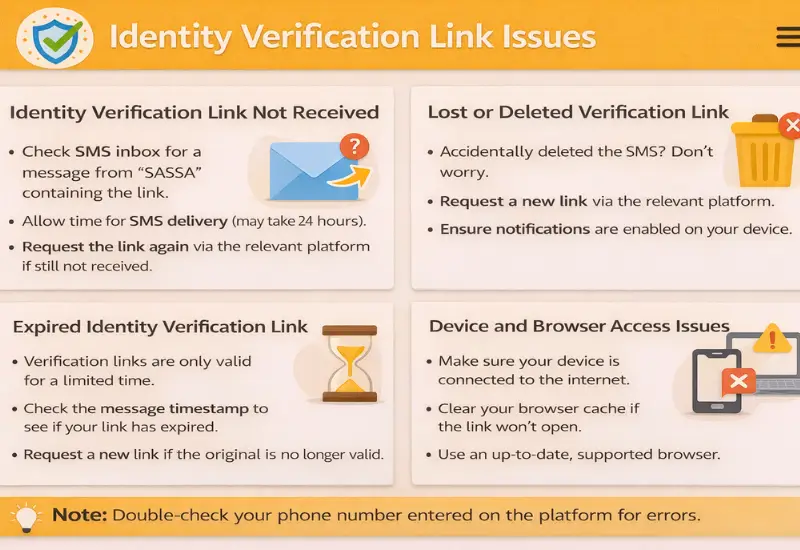
Identity Verification Link Not Received
If the SMS containing the identity verification link is not received, this may be due to temporary network delays, poor signal coverage, or congestion on the mobile network. In some cases, the first notification message arrives but the second message containing the link is delayed.
Beneficiaries do not need to wait for repeated SMS notifications. When the SRD status shows “Identity Verification Required”, a new link can be requested directly from the SRD status page using the “Request Identity Verification” option.
Lost or Deleted Verification Link
If the verification SMS is accidentally deleted or the link is misplaced, the original link cannot be recovered. In such cases, the correct recovery step is to return to the SRD status page and request a new verification link. The system will issue a fresh link to the registered mobile number.
Expired Identity Verification Link
Identity verification links are valid for a limited time, usually up to 72 hours. If the link is not used within this period, it expires automatically. An expired link does not result in permanent failure and does not cancel the SRD application. Beneficiaries can request a new link through the SRD system and repeat the verification process. Payments remain paused until verification is successfully completed.
Device and Browser Access Issues
Verification links may fail to open or function correctly on unsupported devices or outdated browsers. To avoid access problems, beneficiaries should:
- Use a smartphone or device with a functioning camera
- Ensure the browser is updated
- Allow camera permissions when prompted
- Maintain a stable internet connection
Key Recovery Reminder
SASSA does not resend verification links through social media, phone calls, or informal channels. Using the status page to request a new link is the safest and most reliable recovery method.
Post-Verification Processing and Impact on SRD Payments
After SRD biometric identity verification is completed, the information enters a review and confirmation phase within the SRD system. This stage confirms the beneficiary’s identity but does not change eligibility rules or override monthly assessments.
Understanding what happens after verification helps manage expectations and reduces unnecessary follow-ups.
Check Your eKYC Verification Status
After submitting your facial verification, your result does not update immediately. SASSA processes biometric submissions separately from your monthly grant status — allow 48 hours to 21 working days for your verification result to reflect.
To see whether your eKYC has been confirmed, use the official status check below.
Verification Processing and Status Updates
Biometric verification results are processed separately from the regular SRD application. As a result:
- SRD status updates may not reflect immediately
- A short processing period is normal after submission
- No further action is required unless the system requests additional verification
Beneficiaries are advised to allow sufficient time for the verification process to complete rather than submitting repeated requests.
Effect on SRD Payments
Once identity verification is successfully confirmed:
- Identity-related payment blocks are cleared
- Payments may resume in the next available payment cycle
- Monthly eligibility assessments continue as normal
Advice -- Verification confirms who the beneficiary is, not whether they qualify. A beneficiary may still be declined for a specific month if eligibility criteria are not met, even after verification is completed.
Payments While Verification Is Pending
If identity verification is not completed:
- SRD payments remain on hold
- Paydays may not be assigned or may not reflect
- Approval alone does not guarantee payment
Completing biometric identity verification promptly is therefore essential to restore normal payment processing under the SRD system administered by SASSA.
Common Causes of SASSA Identity Verification Failure
Biometric identity verification failures are usually caused by technical or procedural issues rather than problems with SRD eligibility. When verification fails, payments remain paused until the issue is resolved, making it important to understand the most common causes and how they occur.
Poor Image Quality During Selfie Capture
Facial verification relies on a clear, live image. Verification may fail if:
- Cause 1: The selfie is blurred or taken in low light
- Cause 2: The face is not fully visible or is partially covered
- Cause 3: The camera struggles to focus
- Cause 4: The image is captured while moving
Using good lighting, holding the camera steady, and ensuring the face is centred greatly improves success.
Identity Mismatch With Official Records
Verification can fail when the facial image does not sufficiently match official identity records. This may happen if:
- A different person attempts to complete the verification
- The selfie does not resemble the official ID record closely enough
- The image quality prevents accurate matching
Only the original SRD applicant may complete biometric verification. There might be an error or risk of identity theft. It is highly recommended to contact SASSA in this situation.
Interrupted or Incomplete Verification Process
The system requires the verification process to be completed in one session. Failures may occur if:
- The internet connection drops during submission
- The verification link is closed before completion
- Camera permissions are denied
Expired or Reused Verification Links
Verification links are time-limited and can only be used once. Attempting to:
- Use an expired link
- Reopen a previously used link
will result in failure. In such cases, a new link must be requested through the SRD status page.
Multiple Failed Attempts in a Short Period
Repeated failed attempts may temporarily block further verification requests as a security measure. This is intended to prevent misuse of the system. When this happens, beneficiaries may need to wait before requesting a new link and attempting verification again.
Reminder: A failed biometric verification does not automatically disqualify a beneficiary from the SRD grant. It simply means that identity confirmation was not completed successfully.

Circumstances That Require SRD Biometric Identity Verification
SRD biometric identity verification is applied in specific situations where additional identity confirmation is required. It is a system-controlled safeguard used to protect beneficiaries and ensure that SRD grants are accessed, updated, and paid only to the rightful applicants. Verification is not triggered arbitrarily. It is introduced when the SRD system identifies conditions that require stronger identity assurance before allowing payments or record updates to proceed.
Mandatory Biometric Enrolment for New and Reapproved Applications
From 1 September 2025, biometric enrolment became a compulsory part of the SRD application process. This applies to:
- Newly captured SRD R370 applications
- Applications that are reapproved after reassessment
In these cases, biometric enrolment is required to register the applicant’s identity in the SRD system. Without completing enrolment, the application remains incomplete and payments cannot be processed.
Identity Verification for Existing SRD Beneficiaries
Existing beneficiaries may be required to complete biometric identity verification when the system requires confirmation that the person accessing the grant is the original applicant. This commonly occurs when:
- The SRD status shows Referred or Identity Verification Required
- A request is made to change or update a registered mobile number
- Banking or payment details are updated
- Identity inconsistencies are detected during monthly assessments
In these situations, verification is used to confirm identity before allowing further processing.
Fraud-Risk and System Integrity Triggers
Biometric verification may also be triggered when the system detects elevated fraud risk, such as:
- Repeated changes to contact or payment details
- Patterns associated with identity misuse
- Links to previously flagged phone numbers or accounts
Clarification: Being asked to complete biometric identity verification does not mean a beneficiary has done something wrong. In most cases, it is a routine control applied to safeguard grant records and prevent unauthorised access. Payments may be temporarily paused until verification is completed, after which normal processing can resume.
CRITICAL SECURITY WARNING: SASSA does not conduct identity verification via:
- WhatsApp messages or groups.
- Unsolicited phone calls asking for personal details.
- Social media platforms (Facebook, Instagram, etc.).
- Email attachments from unofficial addresses.
Only use verification requests initiated through the official SRD website https://srd.sassa.gov.za and delivered via SMS to your registered number. Any attempt to bypass the official process may lead to payment delays, declined applications, or fraud investigations.
Official SRD Reference Links
Use only these official channels for SRD status checks, appeals, and fraud reporting.
| Service | Official Link / Contact |
|---|---|
| SRD Status Portal | https://srd.sassa.gov.za/sc19/status |
| SRD Appeals Portal | Official SASSA Appeal Website |
| SASSA Call Centre | 0800 60 10 11 Free call · |
| SAFPS (Fraud Listing) | SAFPS Official Website 0860 101 248 |
| SASSA Fraud Email | GrantsEnquiries@sassa.gov.za |
This is an independent informational resource. It is not affiliated with SASSA or the South African government. For all official actions, use verified SASSA portals only. Information on this page is reviewed regularly — see the "Last verified" date at the top of this article.
- Added "SRD Status Shows Active But You Never Applied" Guide link
- Write best and easy way to understand and solve Identity verification for Beneficiaries
- Updated SASSA Identification issue reasons section, added official reference links.
- Initial publication of identity verification guide, including verification requirements and FAQs about it.