
Update or Change SASSA Banking Details for SRD Grant
Published: Updated: · 5 min read · Written by: Themba Matlou
Quick answer: To update or change your SASSA SRD banking details, open the SASSA banking details section, enter your 13-digit ID number and registered cellphone number, and submit your new account details. The account must be in your own name — SASSA will not pay into someone else's account. After you submit, SASSA runs a bank verification check that usually takes a few working days, and your payment is released once it passes.
Official Procedure to Update SRD R370 Banking Details
Postbank Black Card migration →Still using a SASSA Gold Card?Gold Cards stop working after 31 August 2026. How to swap free of charge.SASSA allows SRD R370 beneficiaries to add or change banking details online using the official SRD system. This is the only recommended method on vsrd.co.za/banking-details for updating payment information. Banking details cannot be changed through WhatsApp, SMS links, or third-party websites.
Steps Involved:
Step 1: Visit the Official SRD Website
Go to srd.sassa.gov.za using a secure browser. This is the official platform managed by SASSA for SRD applications and updates.
Direct Banking Details Link: https://srd.sassa.gov.za/sc19/banking-details-update
Step 2: Open the Banking Details Update Option
- On the website, select the option related to changing or updating banking details for South African ID holders. This section is specifically provided for SRD beneficiaries who need to correct or update payment information.
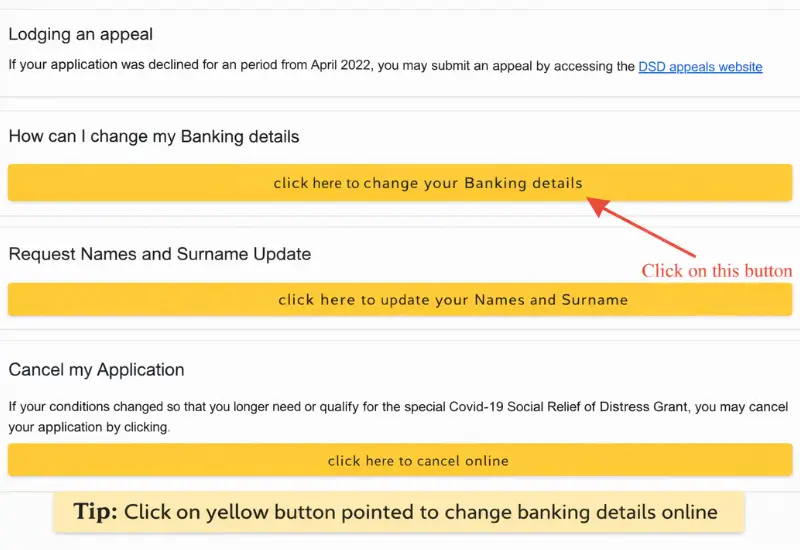
Step 3: Enter Your South African ID Number
- You will be asked to enter your 13-digit South African ID number. This is used to identify your SRD application and confirm that you are the original applicant. shown below
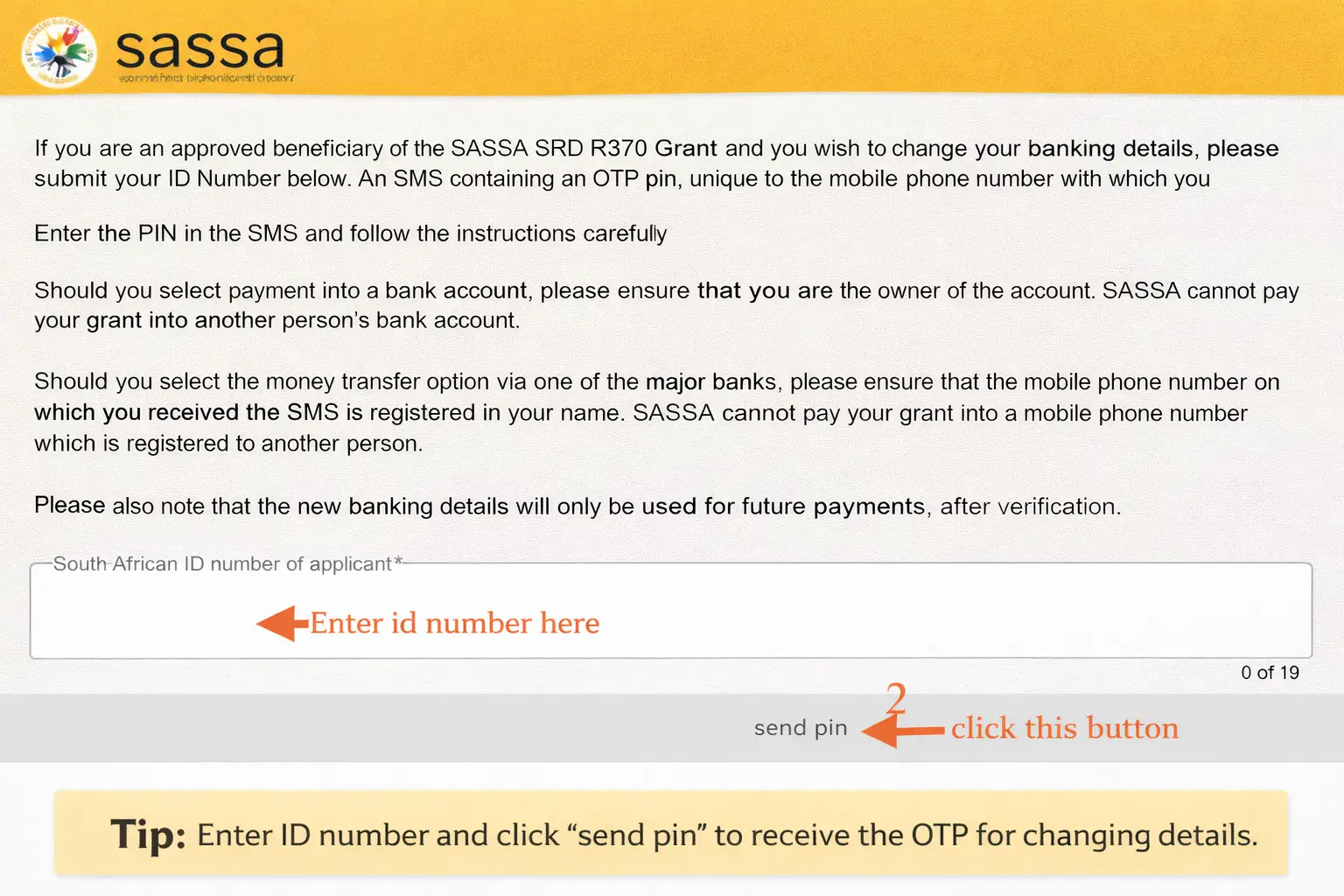
Step 4: Complete OTP Verification
An OTP (one-time PIN) is sent by SMS to the mobile number you used when applying for SRD. Enter this OTP to verify your identity. If you no longer have access to this mobile number, it must be updated before you can proceed with banking changes. Update it Here
Step 5: Provide or Update Banking Details
- After verification, you can:
- ➔Add banking details for the first time, or
- ➔Change existing banking details
- You will be required to enter:
- ➔Bank name (selected from the official list)
- ➔Bank account number
- ➔Account type (for example, cheque/current or savings)
The bank account must be in your own name. SASSA does not pay SRD grants into third-party accounts.
Step 6: Accept the Declaration and Consent
- Before submitting, you must confirm that:
- The banking details provided belong to you
- You consent to SASSA verifying the details with the bank
Without accepting these terms, the update cannot be submitted.
Step 7: Submit and Wait for Verification
Once submitted:
- The banking details are sent for verification
- No documents need to be uploaded
- Updates apply to future payments only, after verification is completed
Verification may take time, and payments are processed in the next available payment run once the details are approved. Note: All updates must be completed on the official SRD website, where SASSA verifies your identity and banking information before using the new details for payment.
Change SRD Banking Details to a Specific Bank (Capitec, TymeBank, and Others)
SASSA does not provide separate procedures for individual banks. Whether you are changing your SRD banking details to Capitec, TymeBank, FNB, Standard Bank, Nedbank, Absa, or another recognised South African bank, the steps followed on the SRD website are identical.
When switching to a different bank:
- You must submit the update through the official SRD website
- The bank account must be registered in your own name
- Write the bank name in the required field while entering details
- The account must be active and able to receive EFT payments
- OTP verification is still required using your registered mobile number
There is no option to select a bank-specific process or submit changes directly through the bank. All updates are verified and approved by SASSA before payments are made.
Once the new banking details are verified, future SASSA payments will be made into the newly selected bank account, regardless of which bank you choose.
Choosing a Payment Method for SRD: Bank Account or Money Transfer (Cash Send)
When updating SRD banking details, beneficiaries are required to select a preferred payment method. SASSA provides more than one payment option to accommodate different circumstances, but each option has specific rules and verification requirements. Understanding these options helps beneficiaries switch methods that best suit their situation and avoid payment delays.
Direct Bank Account Payment
This is the most common and recommended payment method.
- With this option:
- The SRD grant is paid directly into a bank account registered in the applicant’s name.
- Payments are made electronically via EFT (Electronic Funds Transfer).
- Banking details must be verified before payments can be processed.
- Key requirements
- The bank account must belong to the applicant.
- The account must be active and able to receive EFT payments.
- Incorrect or third-party accounts will result in payment failure.
- Beneficiaries usually update or change banking details when:
- They open a new bank account.
- They previously used a different payment method.
- Payments failed due to incorrect or outdated details.
Money Transfer Option via a Major Bank (Cash Send or cardless payment)
SASSA also offers a money transfer (cash send) option through participating banks.
With this method:
- The grant is sent as a secure money transfer
- Collection is linked to the mobile number used during application
- The mobile number must be registered in the applicant’s own name
Important considerations:
- If the mobile number is not registered in the applicant’s name, payment may fail
- OTP and SMS notifications are required to access the funds
- Fraud checks are stricter for shared or previously flagged numbers
This option is often used by beneficiaries who do not have a bank account.
Retail Cash Collection (When Available)
If a beneficiary does not have a bank account, SASSA may provide alternative cash collection methods through designated retail outlets, depending on availability.
These may include:
- Pick n Pay
- Boxer
- Shoprite
- Checkers
- Usave
In such cases:
- The beneficiary selects the cash collection option on the SRD website
- No banking details are required
- Payments are collected using a voucher or SMS-based system
- Beneficiaries need to go to outlets to receive payment
Available collection methods can change, so beneficiaries should always confirm current options on the official SRD website.
Switching Between Payment Methods
Beneficiaries are allowed to change their payment method if their circumstances change. For example:
- Switching from cash collection to a bank account
- Moving from money transfer to direct bank payment
- Updating details after opening a personal bank account
Any change:
- Must be submitted online
- Requires identity verification
- Applies to future payments only, after verification
Selecting the correct payment method and ensuring all requirements are met helps prevent delays and failed SRD payments.
Common Reasons SRD Beneficiaries Need to Update Their Banking Details
Many SRD beneficiaries are approved for the R370 grant but still experience payment problems. In most cases, these issues are linked to banking details that need to be corrected or verified. Updating banking information allows SASSA to resolve these problems and prepare the account for future payments.
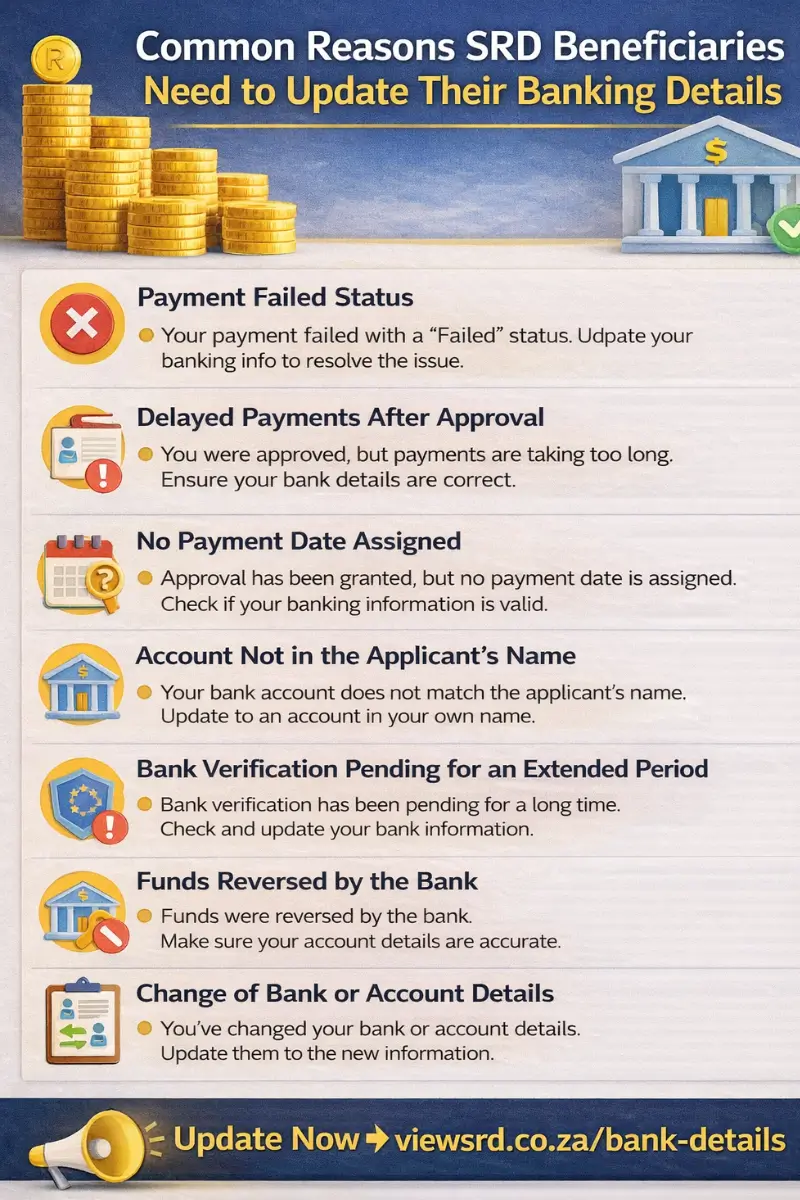
Below are the most common reasons beneficiaries are required to update their SRD banking details.
Delayed Payments After Approval
Approved beneficiaries may experience delayed payments, especially after changing banking details. This happens because:
- New details must be verified before use
- Payments are processed in scheduled payment runs
- Updates made close to a payday may only apply to the next cycle
Delays do not mean the grant was cancelled.
No Payment Date Assigned
If banking details are missing, incorrect, or still under verification, SASSA may not assign a payment date, even if the application is approved. A payment date is only generated once valid banking details are confirmed.
Account Not in the Applicant’s Name
SASSA cannot pay SRD grants into third-party bank accounts. If the account belongs to another person, payments will fail until the beneficiary updates the details to an account registered in their own name.
Bank Verification Pending for an Extended Period
After submitting or updating banking details, the status may show “Bank Verification Pending”. Some delay is normal, but if this status continues for a long time, it may indicate:
- ➔Incorrect or incomplete banking details
- ➔A mismatch between the applicant’s name and the bank account
- ➔Backlogs in the verification process
In such cases, rechecking and updating the banking details is often necessary.
Payment Failed Status
A “Payment Failed” status usually means the bank rejected the payment. This can happen when:
- The bank account number was entered incorrectly
- The wrong bank name or branch code was selected
- The account is not registered in the applicant’s name
- The account is closed, inactive, or restricted
- The account type does not support EFT payments
When a payment fails, the beneficiary must correct and re-submit their banking details for verification.
Funds Reversed by the Bank
In some situations, a payment may be processed but later reversed by the bank.This usually occurs when:
- The bank identifies an issue with the account
- The account cannot accept the deposit
- Ownership verification fails
When funds are reversed, banking details must be updated before future payments can be made.
Change of Bank or Account Details
Beneficiaries may also need to update banking details when:
- ➔ Switching to a new bank
- ➔ Closing an old account
- ➔ Opening a new account
- ➔Correcting previously entered incorrect information
Keeping banking details accurate ensures smoother payment processing.
How Long It Takes for New Banking Details to Be Verified
After you submit or update your SRD banking details, the information must go through a verification process before it can be used for payment. This step is required to confirm that the bank account belongs to the approved beneficiary and can receive SRD payments.
In most cases, banking verification takes several days. However, the exact timeframe can vary depending on:
- The bank involved
- System checks between SASSA and the bank
- Verification volumes at the time of submission
During this period, your SASSA status may display “Bank Verification Pending”. This status is normal and indicates that the verification process is still in progress. It does not mean that your banking details were rejected.
Why Verification Is Not Instant
Banking verification involves multiple checks, including:
- Matching the applicant’s name to the bank account holder’s name
- Confirming that the account number is valid and active
- Ensuring the account can receive electronic payments
- Applying fraud-prevention controls
Because these checks rely on external systems and banking confirmations, verification cannot be completed immediately.
Effect on SRD Payments
New or updated banking details are only used after verification is completed. If verification is still pending when a payment cycle is processed:
- The payment may be delayed, or
- The payment may only be made in the next payment run
Updating banking details close to a scheduled payday can therefore result in waiting until the following cycle for payment.
Contact SASSA for Banking Issues
You should contact SASSA if:
- A payday reflects but no payment is received
- Banking details remain unverified for an extended period
- OTPs are not received
- Payments continue to fail after updating details
SASSA Call Centre: 0800 60 10 11
Important Considerations for Your Banking Details
Banking details are not only about receiving payment correctly. It is also a security and compliance requirement. SASSA uses banking information to protect the SRD system from fraud and to confirm that beneficiaries continue to meet eligibility rules. Understanding these considerations helps prevent payment interruptions, declined statuses, and long-term issues with your SRD grant.
Do Not Share Banking Details or OTPs With Anyone
Your banking details and OTPs are personal and confidential. They should never be shared with:
- Friends or family members
- Agents or “helpers”
- WhatsApp groups or social media contacts
Sharing OTPs or banking information allows others to access or alter your SRD record. If fraudulent activity is detected, SASSA may decline payments or suspend the grant, even if the applicant did not intend to commit fraud.
Understand That Fraud Detection Can Affect Payments
SASSA applies fraud-prevention checks across the SRD system. If suspicious activity is detected, this may result in:
- Payment delays
- Payment declines for specific months
- Requests to re-verify banking or contact details
These checks are applied automatically and are part of protecting public funds.
Be Careful With Unexpected or Unexplained Deposits
SASSA uses bank verification data to assess monthly eligibility for the SRD grant. If funds are detected in your account above the allowed threshold for a specific month, your SRD status may be declined for that month.
Important points to note:
- Unexplained or frequent deposits can affect eligibility
- Using an account that receives income for other people can cause issues
- Shared or business-use accounts increase the risk of declines
To avoid problems, use a personal account used only for your own transactions.
Only Use the Official SRD Website
Always update banking details directly on the official SRD website. Do not:
- Click on links sent via WhatsApp or SMS
- Enter details on third-party websites
- Trust social media posts claiming to “fix” banking problems
SASSA does not request banking details through informal channels.
Frequently Asked Questions: SRD Banking Details
Q1: Can I use someone else’s bank account for my SRD grant?
No. The SRD R370 grant can only be paid into a bank account registered in the name of the approved applicant. SASSA does not allow payments into accounts belonging to a spouse, parent, friend, or any third party. Using another person’s account will result in payment failure or rejection during verification.
Q2: What happens if I enter incorrect banking details?
If incorrect banking details are submitted, the SRD payment may fail or be returned by the bank. In such cases, you will need to return to the official SRD website and re-enter the correct details. Once corrected, the new details go through verification again before payments can resume.
Q3: How often can I change my banking details?
SASSA limits how frequently banking details can be updated as a security measure. In most cases, only one update is allowed within a specific period, such as within 24 hours. If you need to make another change, you may be required to wait before submitting a new request.
Q4: Will I lose my SRD payment if it fails because of banking details?
If you were approved for a month but the payment failed due to banking issues, the grant is not automatically lost. Once correct banking details are submitted and verified, SASSA may process outstanding approved payments. However, delays in updating details can affect how quickly payments are resolved.
Q5: How will I know if my banking details update failed?
SASSA does not always send SMS notifications for failed banking verification. The most reliable way to check is by viewing your SASSA SRD status online, where messages such as “Payment Failed” or verification-related updates may appear. Regularly checking your status is recommended after submitting new banking details.
Official Links
Use only these official channels for SRD status checks, appeals, and fraud reporting.
| Service | Official Link / Contact |
|---|---|
| SASSA Official Website | Main WebPage of SASSA |
| SASSA Call Centre | 0800 60 10 11 Free call · |
| SAFPS (Fraud Listing) | https://www.safps.org.za ↗ 0860 101 248 |
| SASSA Fraud Email | GrantsEnquiries@sassa.gov.za |
- Added Post Bank Black Card Guide link
- Internal structure optimised for improved clarity on update/change Banking details.
- Initial SASSA Change Banking details online process guide publication.