
SASSA WhatsApp Self-Service 082 601 0111: What It Does and How to Use It
Published: Modified: Last verified: September 2026Written by: Themba Matlou
The official SASSA WhatsApp self-service number is 082 601 0111. Save it, open WhatsApp and send "Hi", then tap Main Menu. The menu has three options: My COVID19 SRD, Social Grants and SASSA FAQ. The service is an automated chatbot, free from SASSA, and available 24 hours a day.
- WhatsApp number: 082 601 0111 (+27 82 601 0111)
- Account name: South African Social Security Agency, with a verified badge
- Start message: Hi
- Type of service: automated chatbot, not a live agent
- Available: 24 hours a day, 7 days a week
- Cost: no SASSA fee, normal WhatsApp data charges apply
- Verification: OTP sent to the cellphone number on your application
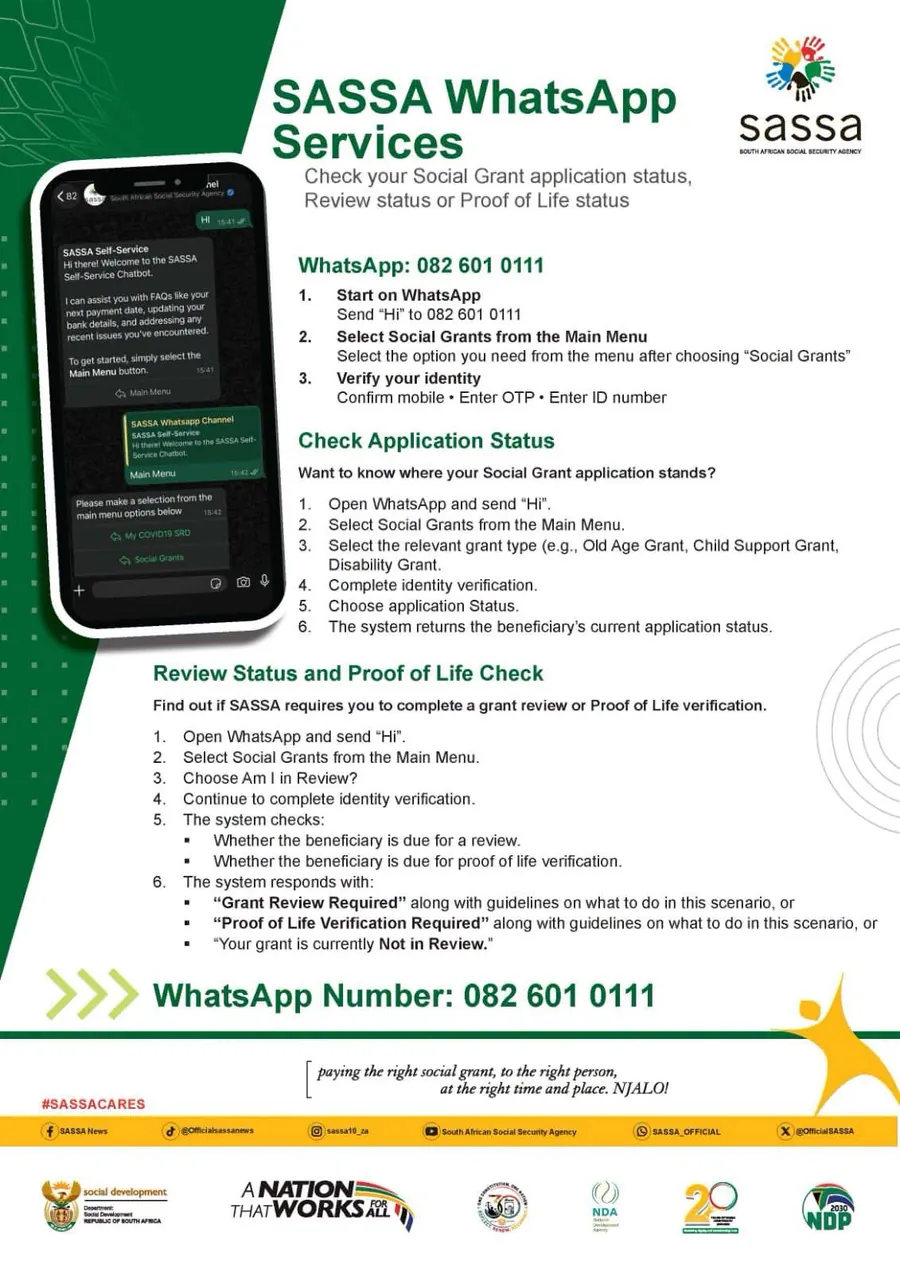
Source: SASSA official WhatsApp Services flyer.
SASSA launched this WhatsApp channel in 2026 to cut queues at local offices and pressure on the call centre. It is an automated chatbot. You tap options from a menu, verify your identity with an OTP, and the system replies with information about your grant.
SASSA calls it an additional channel, not a replacement for the SRD portal, the call centre, or a SASSA office. Some tasks still have to be done elsewhere, and those are listed further down this page.
Is 082 601 0111 the Official SASSA WhatsApp Number?
Yes. SASSA published 082 601 0111 on its official WhatsApp Services flyer and announced it on its verified X account @OfficialSASSA on .
Check these three things before you share any details:
- The account name shows South African Social Security Agency with a verified badge
- The first reply introduces itself as SASSA Self-Service
- You started the chat yourself after saving the number, not by tapping a forwarded link
Why Do Some Websites Show 082 046 8553?
SASSA used 082 046 8553 when the SRD grant launched in 2020, and many older guides were never updated. For the self-service menu described on this page, use 082 601 0111.
What the SASSA WhatsApp Chatbot Can Do
The welcome message lists what the chatbot handles. According to SASSA, it can help you with:
- Your next payment date
- Updating your bank details
- Recent issues you have had with your grant
- Social grant application progress
- Whether your grant needs a review or Proof of Life verification
- Frequently asked questions about SASSA grants
How to Start a Chat With SASSA on WhatsApp
- Save 082 601 0111 in your phone contacts as "SASSA WhatsApp"
- Open WhatsApp and find the contact, refresh your contact list if it does not appear
- Confirm the verified badge next to South African Social Security Agency
- Send Hi
- Read the welcome message, then tap the Main Menu button
- Select the option that matches your grant
Send "Hi" again at any point to restart the chat from the beginning.
SASSA WhatsApp Main Menu Options
The main menu has three options. Choose the one that matches your grant type.
| Menu Option | Who It Is For | What You Need |
|---|---|---|
| My COVID19 SRD | SRD R370 applicants and beneficiaries | Cellphone number used on your SRD application, plus the OTP |
| Social Grants | Older Persons, Disability, Child Support and other permanent grants | Mobile number, OTP and ID number |
| SASSA FAQ | Anyone with a general question | Nothing, you can browse the topics |
How Identity Verification Works
Both grant options ask you to verify before the chatbot shares anything. Verification has three parts, and the ID number step applies to the Social Grants option.
- Confirm your mobile number. Type the cellphone number registered with SASSA.
- Enter the OTP. SASSA sends a one-time PIN to that number.
- Enter the ID number. Required for the Social Grants option.
The number you type must be the exact one linked to your application. SASSA links your whole application to that number and sends the OTP there, so any other number cannot be verified.
Before you type your number, the chatbot shows a notice confirming SASSA may use your information to verify your identity. That notice is part of the official flow.
How to change your SRD phone number →No longer have access to that number?The chatbot cannot verify you until you update it first.SASSA FAQ Topics on WhatsApp
Select SASSA FAQ from the Main Menu to read answers without verifying your identity.
| FAQ Topic | What It Covers | More on ViewSRD |
|---|---|---|
| Social grant increases | Changes to grant amounts | — |
| Way to apply for grant | How to apply for SASSA grants | SRD application guide |
| Required documents | Documents needed when applying | SRD eligibility requirements |
| Next payment date | When grants are paid each month | SASSA payment dates |
| Ways to receive payment | Bank account, card and collection options | Change banking details |
| Card replacement | Replacing a lost or expired SASSA card | — |
| SASSA jobs | Employment opportunities at SASSA | — |
| Grant review | Why and how permanent grants are reviewed | — |
| Biometric | Biometric identity verification | Identity verification |
| More SASSA FAQs | Further topics in the chatbot | — |
Nobody can charge you to secure a SASSA job. Ignore anyone who asks for payment in exchange for a post.
What SASSA WhatsApp Cannot Do
- Submit a new SRD application. There is no apply option in the menu. See how to apply.
- Lodge an SRD appeal. Appeals go through the SASSA appeals portal. See the SRD appeal guide.
- Verify you without your registered number. The OTP only goes to that number, so update your number first.
- Complete eKYC biometric verification. That is done on the official SRD portal or at a SASSA office. See identity verification.
- Resolve identity fraud. If someone applied using your ID, it must be reported. See SRD active but never applied.
- Connect you to a live agent. The menu is automated, call 0800 60 10 11 to speak to a person.
Where to Go for Each SASSA Task
Use this table to decide whether WhatsApp is the right channel before you start a chat.
| What You Need to Do | Use WhatsApp? | Correct Channel |
|---|---|---|
| Find your next payment date | Yes | WhatsApp or SASSA payment dates |
| Update your banking details | Yes, SASSA lists this as a service | WhatsApp or the SRD banking details guide |
| Check a social grant review or Proof of Life | Yes | WhatsApp, Social Grants option |
| Read general SASSA information | Yes | WhatsApp, SASSA FAQ option |
| Apply for the SRD grant | No | SRD application guide |
| Appeal a declined month | No | SRD appeal guide |
| Change the number on your application | No | Change your SRD number |
| Complete eKYC verification | No | Identity verification guide |
| Report fraud on your ID | No | Report SRD identity fraud |
SASSA WhatsApp Not Working? Quick Fixes
| Problem | How to Fix It |
|---|---|
| No reply after sending "Hi" | Check the number is saved as 082 601 0111 or +27 82 601 0111, check your data or Wi-Fi, then send "Hi" again |
| Contact not showing in WhatsApp | Refresh your WhatsApp contact list after saving the number |
| Chat stops part-way through | Send "Hi" to restart from the main menu |
| OTP is not arriving | Confirm you typed the number on your application, make sure that SIM is active with signal, then wait a few minutes before retrying |
| Verification keeps failing | Use the exact number linked to your application, if you changed numbers update it first |
| The chatbot cannot handle your issue | Call 0800 60 10 11 or visit a SASSA office with your ID |
SASSA WhatsApp FAQ's
What is the official SASSA WhatsApp number?
The official SASSA WhatsApp self-service number is 082 601 0111. SASSA published it on its WhatsApp Services flyer and announced it on its verified X account in August 2026. Save the number and send "Hi" to start.
Which cellphone number must I use on SASSA WhatsApp?
The exact number linked to your application. SASSA sends the OTP to that number, so no other number can be verified, even if you own both SIM cards.
Can I apply for the SRD grant on WhatsApp?
No. The main menu has no application option. Apply for the SRD R370 grant online at srd.sassa.gov.za.
Can I change my banking details on SASSA WhatsApp?
SASSA lists updating bank details as one of the chatbot's services. You must verify with your registered number and OTP first. You can also update banking details on the official SRD website.
Is the SASSA WhatsApp service free?
SASSA does not charge for the service. WhatsApp uses mobile data or Wi-Fi, so normal data costs from your network still apply.
Why am I not receiving the OTP?
The OTP goes to the number you typed. Make sure it is the exact number on your application, that the SIM is active and has signal, and wait a few minutes before trying again. If you no longer have that number, you must update it before the chatbot can verify you.
Can I use the chatbot for my parent's grant?
Only with their permission. You need their mobile number, access to the OTP sent to that number, and their ID number for the Social Grants option.
What does "Your grant is currently Not in Review" mean?
It means SASSA does not need a grant review or Proof of Life verification from you at this time. No action is required.
Is 082 046 8553 still the SASSA WhatsApp number?
082 046 8553 is the number SASSA used when the SRD grant launched in 2020, and many older guides still list it. SASSA's 2026 self-service material lists 082 601 0111, so use that number for the menu described on this page.
Can I speak to a real SASSA agent on WhatsApp?
No. The WhatsApp channel is fully automated with menu options. To speak to a person, call the toll-free line on 0800 60 10 11, Monday to Friday between 08:00 and 16:00.
Protect Yourself — WhatsApp Scams to Watch Out For
Fake SASSA WhatsApp numbers spread quickly, especially near payment dates. The safest habit is to save 082 601 0111 yourself and start every chat from your own contacts.
SASSA will never:
| SASSA Never Ask For |
|---|
| Message you first on WhatsApp asking for your OTP, ID number, or banking details |
| Ask you to pay a fee to approve, speed up, or fix your grant |
| Ask for your bank PIN, password, or card number under any circumstances |
| Contact you from a personal account or an unofficial WhatsApp group |
Enter your OTP only inside the chat you started yourself. Never send it to a person.
Report it immediately to SASSA's fraud hotline: 0800 60 10 11 Email: GrantsEnquiries@sassa.gov.za Or report to your nearest SASSA office or local police station.
Official Reference Links
Use only these official channels for SASSA self-service and fraud reporting.
| Service | Official Link / Contact |
|---|---|
| SASSA WhatsApp Self-Service | 082 601 0111 ↗ Automated chatbot · Available 24/7 |
| SASSA Official Website | https://www.sassa.gov.za |
| SRD Services Portal | https://srd.sassa.gov.za ↗ |
| Find a SASSA Office | SASSA Contact & Office Locator ↗ |
| SASSA Call Centre | 0800 60 10 11 Free call · |
| SASSA Fraud Email | GrantsEnquiries@sassa.gov.za |
- Remove unnecessary content
- - Initial publication. Added SASSA WhatsApp self-service number 082 601 0111, main menu options, identity verification steps, Social Grants review and Proof of Life results, FAQ topics, channel routing table, and scam warnings.
Contact Us with Queries
Having Issues? If the SASSA WhatsApp chatbot returns an error or the menu options differ from what is described here, please contact us so we can verify and update this guide. We are not SASSA and cannot access your chat, your application, or your grant. For all official applications, status checks, and appeals, you must use the official SASSA channels linked throughout our guides.
The best way to contact us is via (support@vsrd.co.za)
Thank you for letting ViewSRD be part of your journey.
Social Grants, Review and Proof of Life
The Social Grants option covers permanent grants such as the Older Persons Grant, Child Support Grant and Disability Grant. It is useful if you help a parent or family member with their grant.
Application Progress
The "Am I in Review?" Option
This tells you whether SASSA needs a grant review or Proof of Life verification from the beneficiary.
Using the Chatbot for a Family Member
Only do this with their permission. You need their mobile number, access to the OTP sent to that number, and their ID number.